 designlof.
DESIGNLOF STUDIO / PLAN. DESIGN. BUILD. · STUDIO ALPHA
A little idea. A whole new experience.
Shape ideas into boards, visual designs and interactive screens—all in your browser.
| ● ● ● · Designlof Studio · Local demo |
|---|
 |
Design files · Brainstorm boards · Android screens · Font Lab
Illustration extensions, iOS export and 3D are identified separately as local previews.
Explore the features below.
01 / Design files · Available
Make the idea
visible. And editable.
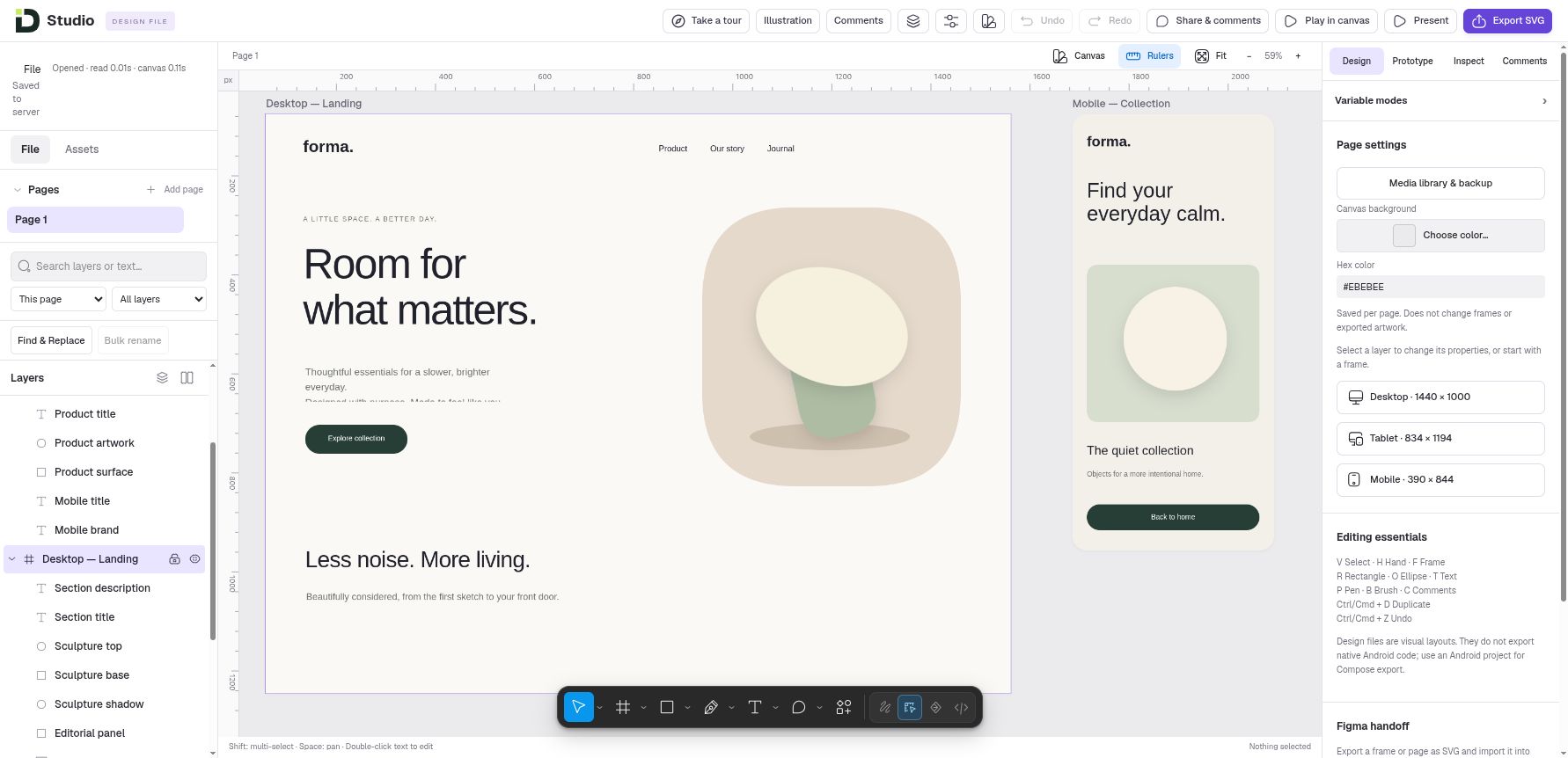
Turn a rough idea into a design you can keep improving. Organize screens with frames, type, images and editable vectors, then reuse the decisions that work across the next screen.
01.1 / CANVAS
Design with control.
Nested frames, shapes, paths and text. Move, resize, arrange and refine anchors; use rulers, layout guides and non-destructive Boolean shapes.
01.2 / LAYOUT
Give every screen room.
Auto layout, Wrap/Grid, Fixed/Hug/Fill sizing and constraints. Create responsive screen families, check overflow and keep independent breakpoints when you need them.
01.3 / SYSTEMS
Reuse the good decisions.
Components, instances, variant axes and supported overrides. Connect private libraries, organize variables and styles, use modes, and review updates before applying them.
Export editable SVG or raster assets. SVG can be imported into Figma, with possible font/effect differences. Studio does not read or write native .fig files.
02 / Prototype & review · Available
Show how it feels.
Talk about what matters.
Help people understand the journey before development begins. Connect screens and states, preview the interactions, and bring feedback back to the exact part of the design.
Connect the experience.
Click, hover, press and delay interactions. Navigate, go back, scroll to a layer, change a variant or open an overlay. Named flows and supported Smart Animate help explain the journey.
Bring motion into view.
Video layers, posters, fit and playback settings; motion presets and numeric keyframes. Play/Pause, seek and Restart keep review manageable. Reduced motion is respected.
Keep feedback in context.
Expiring view/comment review links, pins, replies and resolved threads. Opt in to interactive review and attach a viewed state or a paused video frame.
Work together on design files.
Owner, Editor and Viewer roles, updates after saved changes and recent version history. Independent edits can merge; same-property edits can require conflict review.
Hand off with useful detail.
Inspect dimensions, spacing, typography and token references. Download assets, specifications, tokens, starter CSS and a portable artwork preview for an engineer to implement.
Handoff packages help an engineer implement the design. Backend services and production interactions still need development.
03 / Brainstorm boards · Available
Find the shape
of the problem.
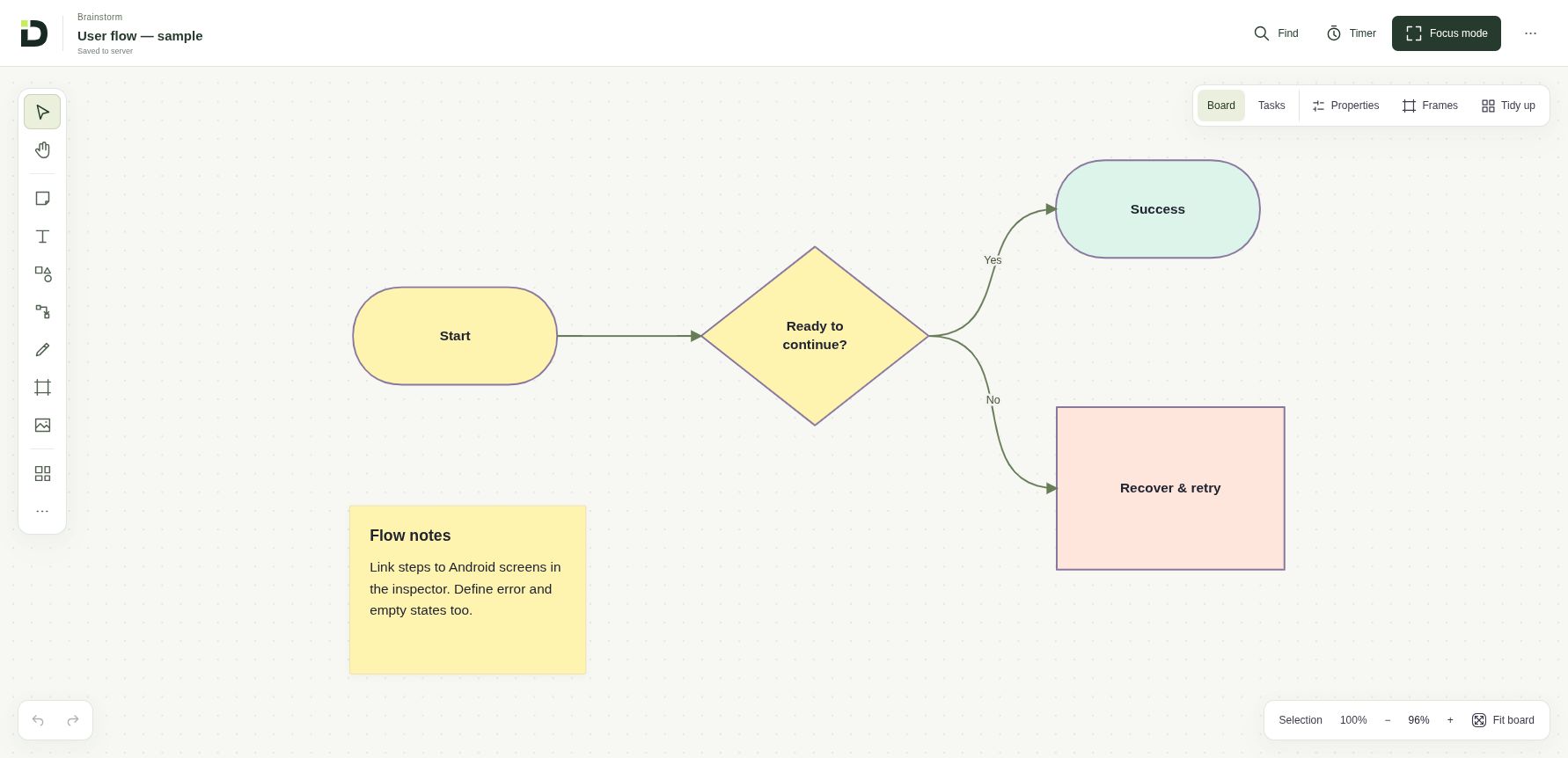
Get the team’s thinking out of scattered messages and onto one board. Map a journey, compare options and keep the questions, decisions and next steps visible.
| ● ● ● · Brainstorm board · Local demo |
|---|
 |
Start with a useful structure.
Flow, mind map, tracker, PRD and design-system starters, plus Idea Sprint, retrospective, SWOT and decision workshop templates.
Think on the canvas.
Notes, text, flowchart shapes, connectors, frames and references. Bulk notes, multi-selection, search, tidy grid, focus mode and a local timer help organize a session.
Turn intent into checks.
Task lanes, owners, priorities and acceptance criteria. Link owned Android screens and run a deterministic checker for explicit rules and stale implementation references.
The board checker checks explicit rules; you review the findings. Shared-file editing currently applies to design files.
04 / Android screen builder · Available
Design the screen.
Connect the next step.
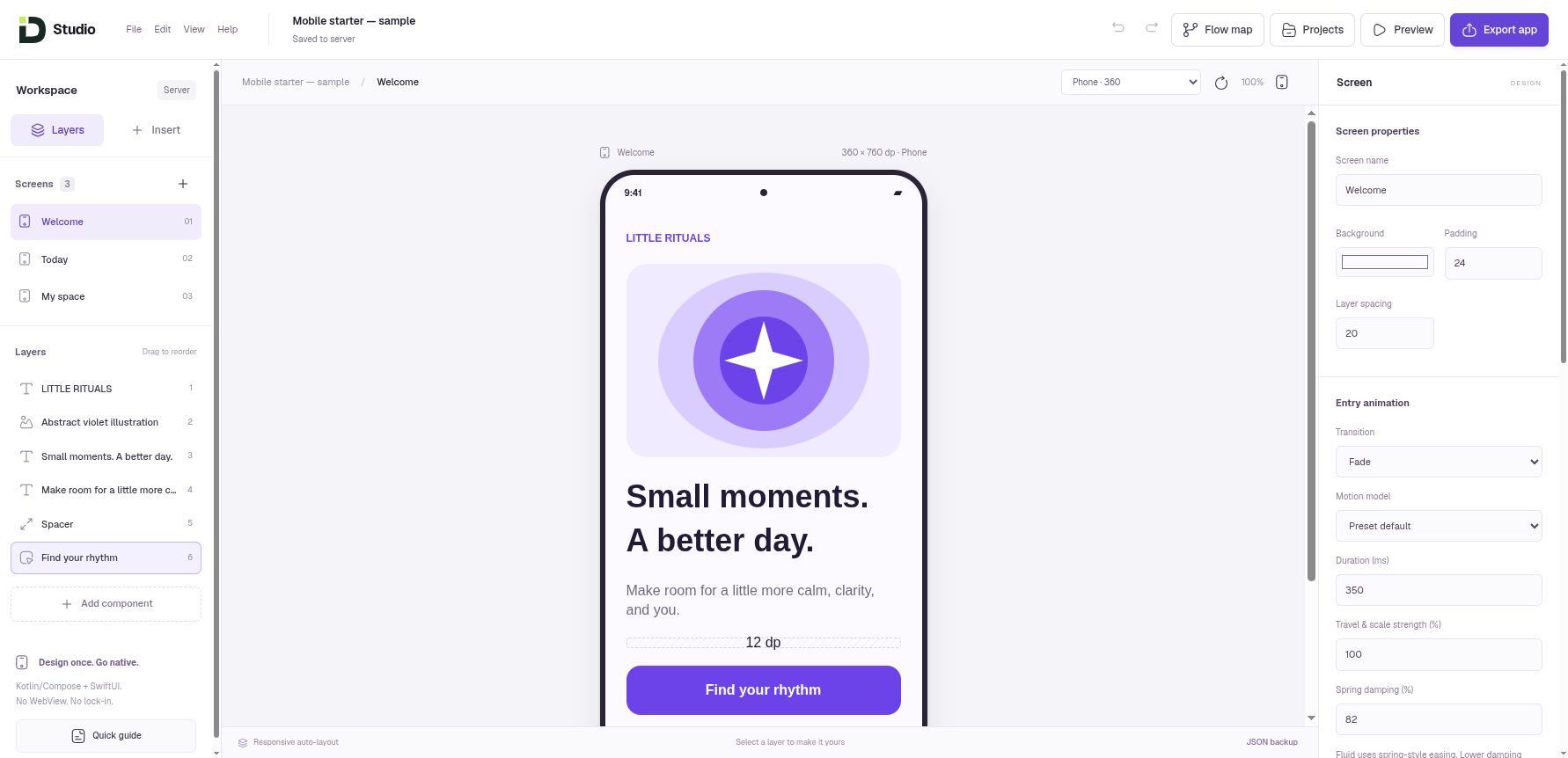
Move from a screen idea to an editable Android UI. Plan adaptive layouts and navigation in the builder, then hand the interface to an engineer with its remaining integration work clearly defined.
| ● ● ● · Android builder · Local demo |
|---|
 |
| ● ● ● · Screen Flow Map · Local demo |
|---|
 |
Preview the behavior.
Phone/tablet presets, rotation, tablet columns, layer spans, navigation history and local control state. Entry motion has editable timing and spring-style options.
Continue in native code.
Android export provides an editable Kotlin/Compose project ZIP with screens, navigation, theme, assets, Gradle Wrapper and project JSON. Developers add services, native QA and release signing.
The browser preview approximates native UI. It is not an Android emulator. Forms, banking examples and payments remain UI simulations.
05 / Font Lab · Available · local drafts
Give your ideas
a voice of their own.
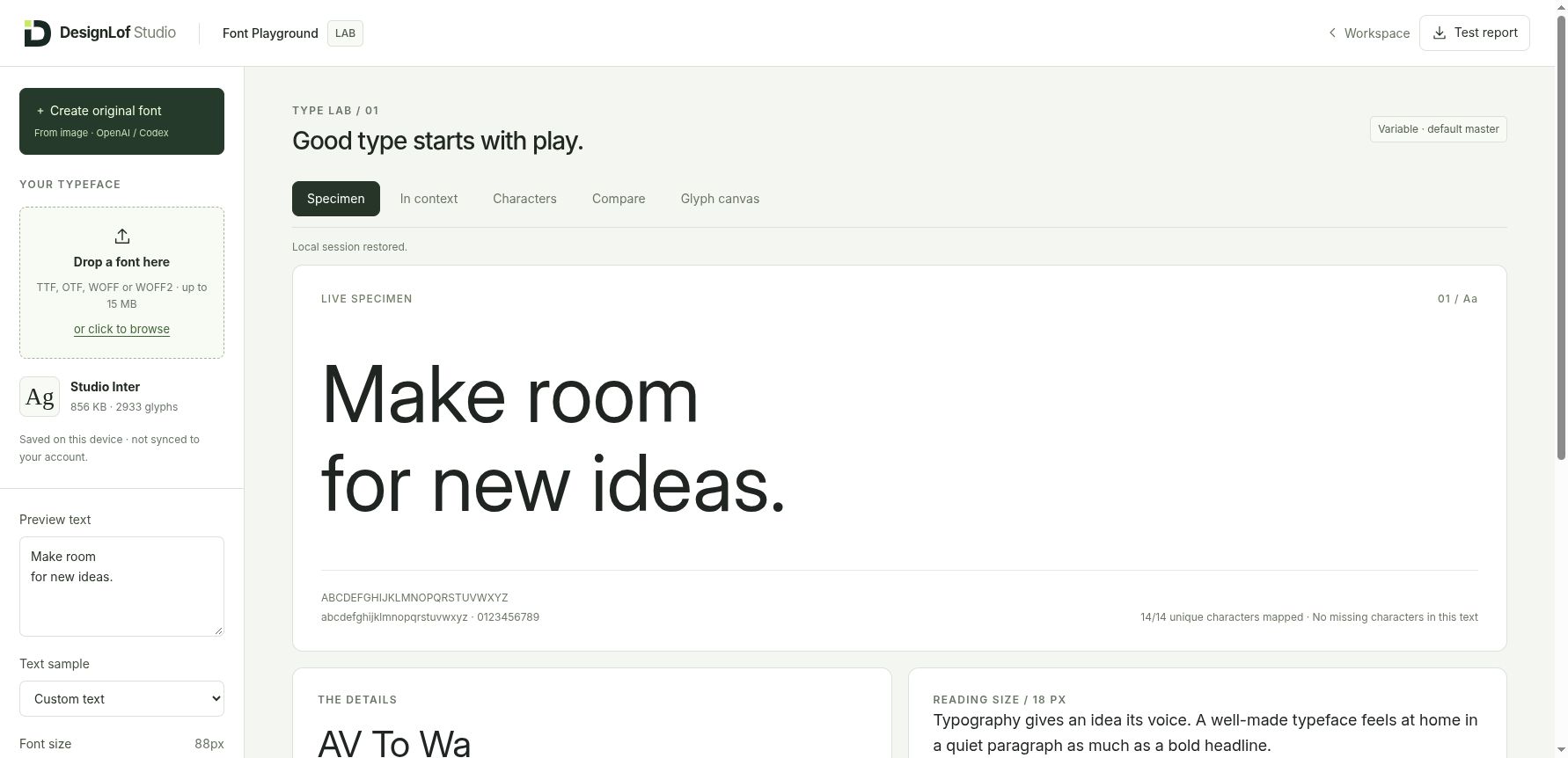
See how a typeface feels in the words people will actually read. Explore the bundled specimen in the live Font Lab, then keep your font work organized as browser-local drafts.
| ● ● ● · Font Lab · Public release |
|---|
 |
See type in context.
TTF/OTF/WOFF specimen testing, WOFF2 preview, website/mobile/poster contexts, comparison upload, spacing and Unicode mapping checks.
Work on the outlines.
Glyph guides, anchors, control points, precise coordinates, transforms and Undo/Redo. Keep editable SVG/JSON drafts separate from a third-party source font.
Review before export.
Deterministic image tracing, accept/discard glyphs, original static OTF export, metadata and license package. Codex uses a manual validated file handoff.
Font drafts stay in this browser. Review source rights, character coverage and font quality before release.
06 / In the local studio
See what is taking shape.
Take a closer look at what is being developed next. These local workspaces extend illustration, mobile export and spatial design; they are shown separately from the public release.
3D Studio
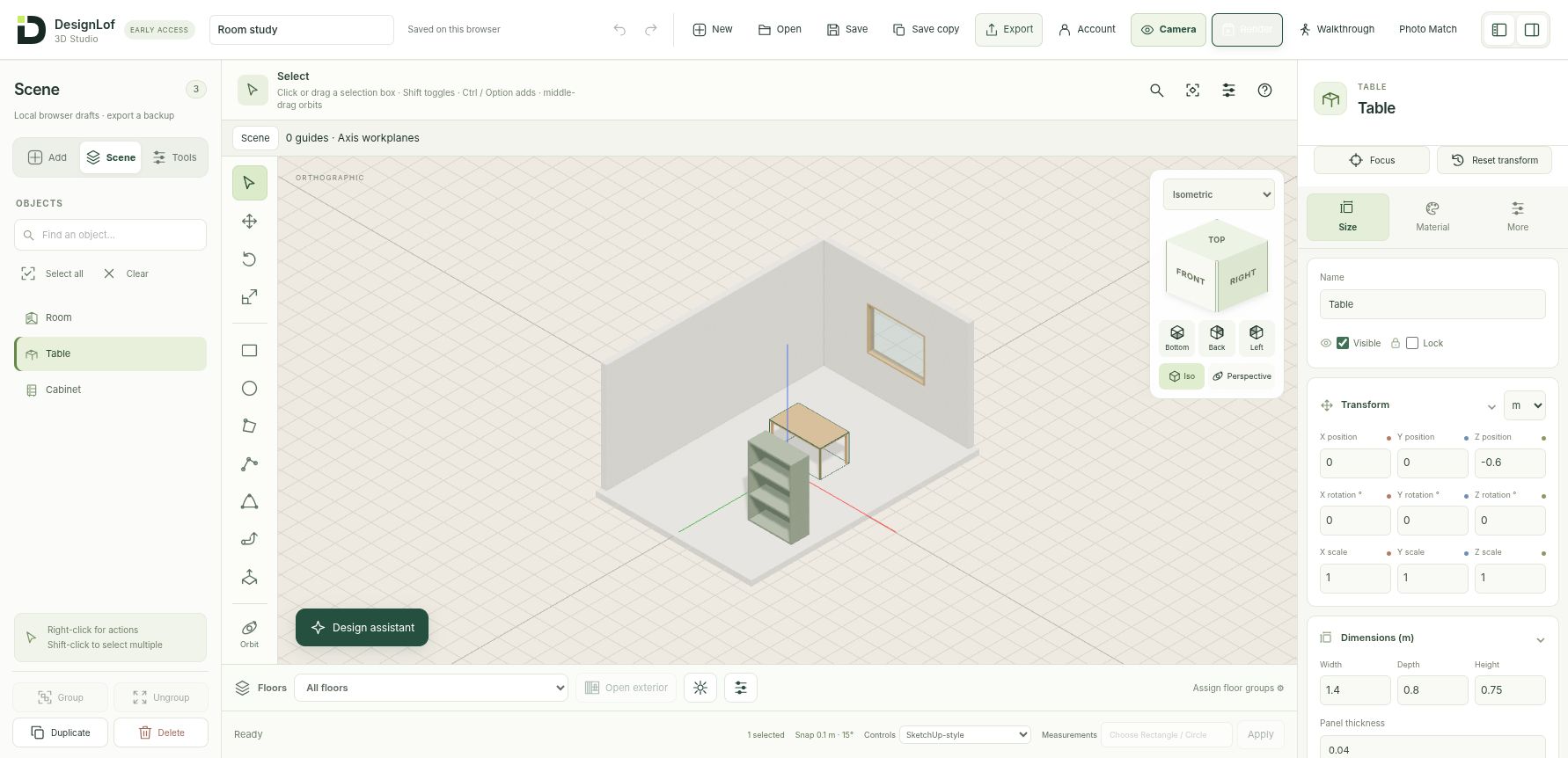
Explore rooms, furniture and dimensional ideas with a real modeling canvas. The local preview includes precision tools, linked assemblies, materials, cameras, working drawings and manual Photo Match.
| ● ● ● · 3D Studio · Local preview |
|---|
 |
Model, assemble and refine.
Metric drawing, workplanes, snapping, supported Push/Pull, Offset and mesh operations; groups, linked assemblies, furniture studies, surface finishes and UV controls.
Look, review and exchange.
Named views, camera markers and mini-preview, temporary Walkthrough, manual Photo Match, native JSON, supported static GLB exchange and draft SVG/PDF working drawings.
Photo Match estimates an upright camera from manually supplied guides and a known length. It is not automatic 3D reconstruction. Drawings are working drafts, and GLB is not universal CAD compatibility. Scene animation and dialog refinements are under development.
Illustration extensions
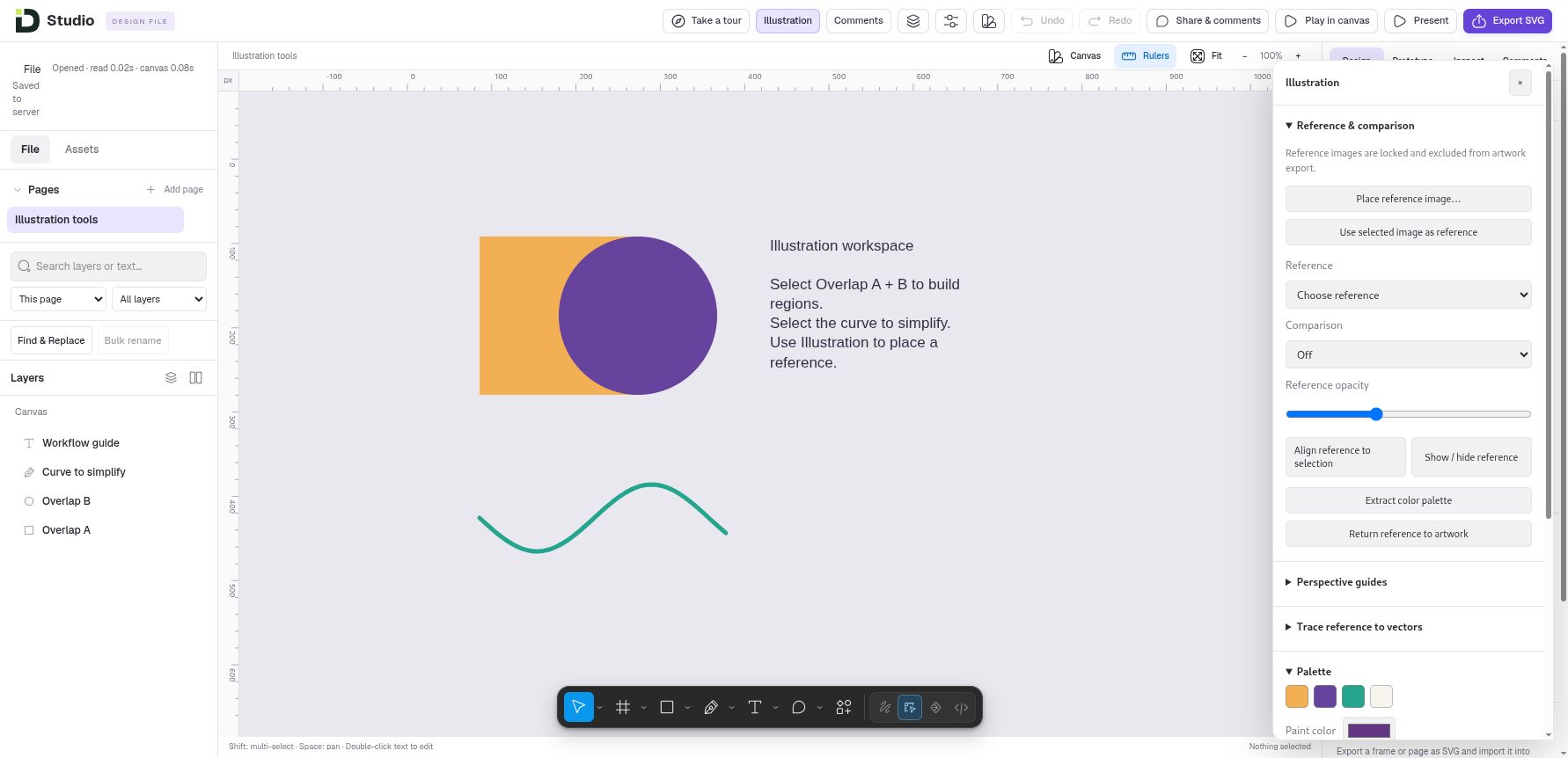
Reference comparison, palettes, path refinement, shape regions, Live Paint and precise commands extend the existing vector canvas. Advanced brushes, paint/mask stacks and imported PNG tips are local work.
| ● ● ● · Illustration · Local preview |
|---|
 |
iOS export extension
The local screen builder can generate a SwiftUI Xcode project with screens, navigation and assets, plus approximate iPhone/iPad canvas presets.
iOS export remains a local preview. Xcode compilation and Apple device testing are still required. Export applies to screen-builder projects; developers handle signing and submission.
· In progress3D scene animation & modal refinement
Saved-view camera playback and improvements to the Photo Match/dialog experience are under development. Release timing is not yet confirmed.
THE COMPLETE FEATURE GUIDE
Find the right tool. Make the next move.
Choose the task you want to tackle. Each category explains the tools, what they help you achieve and the practical limits to keep in mind.
Available = released capability. Local preview = development build. In progress = unfinished work. Optional AI needs a configured provider and your consent.
Last reviewed 1 October 2026.
Organize your workspace
Keep design files, brainstorm boards and Android projects in one file browser.
Font Lab drafts and 3D drafts have different storage behavior.
Find and organize — Available
Search, sort, switch grid/list view, rename and duplicate files.
Workspace limits apply; covers may be illustrative.
Autosave and recovery — Available
Revision-aware server saves show pending, failed and saved states; retain drafts on conflicts.
Wait for saved status; this is not a permanent backup archive.
JSON backup and import — Available
Download editable documents; review validated imports as separate files.
A backup containing stored video references needs the matching media bytes.
Trash, restore and quota recovery — Available
Recover trashed documents; permanently delete only after explicit confirmation.
Permanent deletion is irreversible.
Preferences and guidance — Available
Default device, panels, grid and reduced motion, plus an introductory tour.
Preferences do not automatically change exported native app motion.
Shape a screen
Design websites and app screens on a free-form canvas with nested frames.
Up to 12 pages and 400 layers per file.
Selection and arrangement — Available
Move, resize, rotate, flip, group, align, reorder, copy/paste and Undo/Redo.
Editing respects locks and component-instance restrictions.
Shapes and editable vectors — Available
Rectangles, ellipses/arcs/rings, polygons, stars, lines, arrows and Bezier paths.
Native .fig files are not supported.
Vector anchor editing — Available
Move anchors and handles, box/lasso select, subdivide, round, delete or heal points.
Path/geometry budgets apply.
Boolean geometry — Available
Union, Subtract, Intersect and Exclude keep editable source operands.
Supported closed shapes; not every raster or paint-stack operation.
Text and text on a path — Available
Inline type, typography properties, auto text sizing and curved labels.
Fonts and text wrapping can differ in external applications.
Fills, strokes and effects — Available
Solid/gradient/image fills, strokes, opacity, corner radii, shadows and supported effect stacks.
Export/import support for complex effects varies.
Images, rulers and guides — Available
Embed PNG/JPEG/WebP, use frame layout guides and canvas rulers.
Reference and editor guides do not become exported artwork.
Auto layout and constraints — Available
Horizontal/vertical flow, Wrap/Grid, gap/padding, Fixed/Hug/Fill and min/max dimensions.
You author responsive behavior; Studio does not repair every overflow.
Responsive screen families — Available
Create breakpoints with supported property inheritance or link independent screens.
Structure, interactions and all bindings are not automatically inherited.
Responsive layout check — Available
Inspect authored Phone/Tablet/Desktop behavior and overflow.
A check identifies problems rather than automatically redesigning the screen.
SVG, PNG and asset export — Available
Export configured frame/layer artwork at selected formats and scales.
SVG handoff is not native .fig round-tripping.
Pen, Brush and Pencil — Available
Draw editable vector strokes with basic brush presets, color, width, opacity and smoothing.
Advanced paint stacks and textured/stylus tools are local extensions.
Capture and connect ideas
The local board has a freehand tool and validated ink objects.
Shown in the local preview; public availability is not confirmed.
Planning templates — Available
Blank, flow, mind map, project tracker, PRD and design-system starting boards.
Separate planning documents rather than app screens.
Workshop templates — Available
Idea Sprint, 4 L’s, SWOT, Decision Workshop, Mind Map and User Flow.
Additive, undoable template content; not an AI-generated workshop.
Canvas objects and references — Available
Sticky notes, text, shapes, frames and images; direct editing and bulk notes.
Up to 180 objects and 300 connections.
Flowchart connections — Available
Process/decision symbols, labeled curved/straight/orthogonal connectors and dependencies.
Orthogonal connectors use simple elbows, not obstacle routing.
Task and Kanban planning — Available
Status lanes, owners, priorities, dates, criteria and human-review fields.
Changing a status never grants approval or verifies completion.
Workshop navigation — Available
Find, frames, selection tidy grid, focus mode and a local timer.
Timer is session-local; no multi-user board editing guarantee.
Implementation links and checker — Available
Attach owned Android projects and inspect rule-based findings with stale-report detection.
Checker does not change designs, complete tasks or semantically certify coverage.
Tokens and component contracts — Available
Document reusable planning rules and explicit property checks.
Planning tokens do not automatically modify Android components.
Build a reusable design system
Reuse linked components and update their instances.
Detaching makes a separate editable copy.
Variants and property axes — Available
Author named states and Size/Theme/State combinations; use the variant matrix.
Up to four axes / 32 variants; missing combinations need authored artwork.
Instance overrides — Available
Expose text, visibility, images, nested-instance properties and supported child/size overrides.
Instance editing follows the supported override controls.
Variables and styles — Available
Reuse colors, spacing/numbers, strings, Boolean values, typography, effects and guide styles.
Supported bindings only; no unrestricted expression engine.
Modes and aliases — Available
Use themed collections such as Light/Dark and retain stable library references.
An alias is not an automatic semantic theme generator.
Private cross-file libraries — Available
Connect accessible files and review selected component/style updates.
Connecting a library does not grant access to a private file.
Published library snapshots — Available
Publish private frozen snapshots; consumers choose sources and review updates.
Latest published snapshot retained; not a browsable release archive.
Connect, preview and hand off
Click, hover, press and delay can navigate, go back, change a variant or open/close overlays.
Simulations do not implement backend services.
Connections and named flows — Available
Drag/reconnect canvas ports; choose starting points, default flows and restart.
Some cross-page connections use the inspector.
Smart Animate — Available
Interpolate supported matched layer geometry, color and opacity between screens.
No vector-path or text-content morphing.
Scrolling and overlays — Available
Scrollable frames, fixed/sticky content, scroll-to-layer and dismissable overlays.
Fixed/sticky scope follows supported direct-child rules.
Interactive form simulations — Available
Text/email/number fields, toggles, select, required checks and variable readouts.
No actual form submission; Restart clears runtime values.
Canvas playback and Present — Available
Run a private simulation, stop safely and choose a phone/tablet preview.
A browser prototype is not a published website or native emulator.
Video layers — Available
Upload MP4/WebM, set poster, fit, mute, loop and playback behavior.
50 MB per clip; no external embeds or transcoding; browser autoplay rules apply.
Layer motion and transport — Available
Presets and numeric keyframes, shared Play/Pause, seek and Restart.
Not a multi-track video editor; reduced motion is respected.
Media library and ZIP backup — Available
See stored clips, usage and references; download design JSON plus referenced videos.
ZIP restore needs JSON import plus video re-upload; no automatic ZIP importer.
Inspect and developer ZIP — Available
Resolved dimensions, typography, assets, tokens, specs, starter CSS and portable artwork review.
Engineering still supplies semantic HTML, accessibility and production interactions.
Review together
Explicitly share selected frame snapshots with view/comment permission and expiry.
Sharing is opt-in; revocation cannot recall already downloaded copies.
Interactive client reviews — Available
Opt in to prototype playback, video and comments on a viewed state.
Only selected shared screens/resources; old static links stay static.
Pinned comment threads — Available
Reply, resolve/reopen, filter/search and inspect state/video-time attachments.
Guest display names are unverified; attachments are static images, not recordings.
Shared-file roles — Available
Owner, Editor and Viewer access for shared design files.
Not blanket collaboration across Android, boards, fonts and 3D.
Committed-change updates — Available
Shared editors receive updates and independent edits can merge.
Edits to the same property can require conflict review.
Recent version history — Available
Preview and restore retained shared-file revisions.
Recent revisions are retained within storage limits. Keep separate backups for long-term history.
Build Android interfaces
Build phone/tablet screens with a searchable component library and starter patterns.
Up to 12 screens; focused flat responsive flow, not every Android widget.
Component properties and state — Available
Edit content, images, spacing, appearance and supported initial/disabled/checked states.
Form and search controls demonstrate local UI state.
Phone and tablet layouts — Available
Device presets, rotation, fit, two-column tablet rules and per-layer spans.
Browser frames approximate native dimensions and behavior.
Screen Flow Map — Available
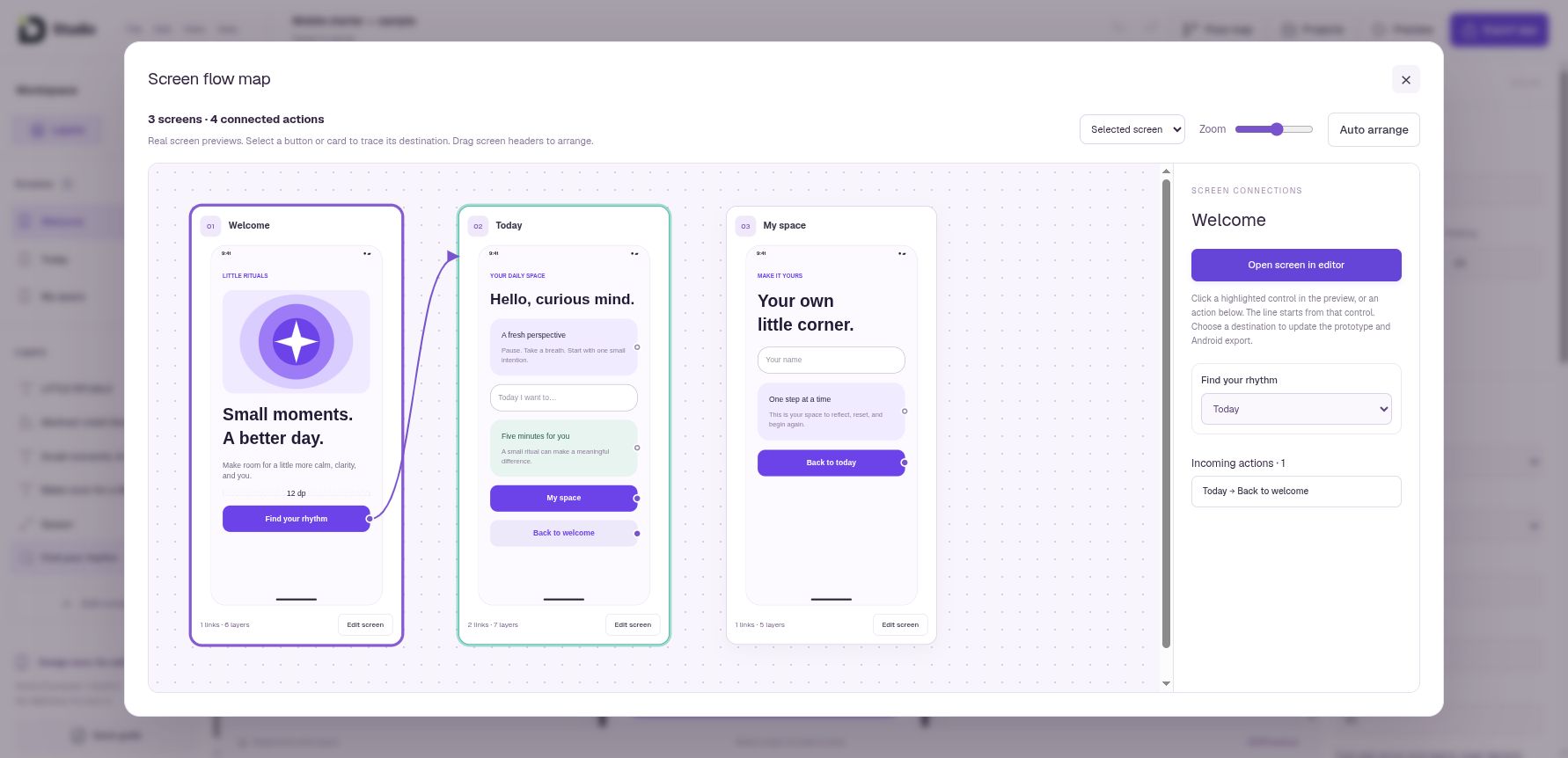
View real rendered screens and trace individual action destinations.
Connections use explicit destination selectors.
Interactive preview and motion — Available
Navigate, exercise controls and try entry transitions with editable timing.
A browser approximation, not an Android emulator.
Native Compose project ZIP — Available
Download editable Kotlin screens, navigation, theme, assets, Gradle Wrapper and JSON.
No backend, accounts, payments or Play Store signing; native QA still required.
Explore mobile export
Generate editable SwiftUI screens, Xcode project, navigation, assets and UI state.
Not confirmed released; no Mac/Xcode compile pass; requires iOS QA and signing.
iPhone and iPad canvas presets — Local preview
Review screen-builder layouts at approximate Apple logical dimensions.
Not an Apple hardware simulator or a Design File-to-native converter.
Work with typography
Upload TTF/OTF/WOFF/WOFF2 and test size, tracking, leading, colors, kerning and ligatures.
Files stay in browser; WOFF2 preview only.
Context, compare and coverage — Available
Website/mobile/poster specimens, comparison font and Unicode mapping checks.
Mapping checks do not certify shaping, hinting or font quality.
Glyph canvas — Available
Inspect/edit outline anchors and handles, coordinates and transforms with Undo/Redo.
Variable fonts use default master; third-party edits remain separate vector drafts.
Image-to-glyph workflow — Available
Crop labeled reference characters, threshold/invert and review deterministic traced contours.
Tracing is not AI; source rights and missing characters require human review.
Original OTF and release package — Available
Export accepted created glyphs with metadata and optional license package.
Partial static OTF; license fields do not certify rights or commercial readiness.
Local drafts and manual handoff — Available
Restore browser-local drafts; exchange a validated reference/result JSON with Codex.
Not account-synced, a marketplace or automatic Codex login.
Refine vector artwork
Lock a reference, compare beside/over artwork and extract reusable colors.
Local workflow; references excluded from artwork export but retained in JSON.
Path refinement — Local preview
Handle modes, split/join, simplify preview and editable region painting.
Not complete Illustrator parity or automatic semantic vectorization.
Perspective and deterministic trace tools — Local preview
Inspect reference guides and trace controls in the local panel.
No claim of generative artwork or exact semantic reconstruction.
Painting and mask stacks — Local preview
Local paint/erase/restore stacks, alpha lock, clip links and imported PNG brush tips.
Not ABR import or a Photoshop raster engine; physical stylus QA remains limited.
Procedural textured brushes — Local preview
Local airbrush/texture presets and editable stroke dynamics.
Local implementation; production release not confirmed.
Precise operations and explorations — Local preview
Validate bounded JSON operations and duplicate artwork before refinement.
Not an unrestricted script runner or automatic new-pose generation.
Explore spatial design
Model boxes, cylinders, profiles, rooms, tables, cabinets and furniture studies.
Concept models, not structural/fabrication certification.
Precision navigation and drawing — Local preview
Orbit/pan, perspective/isometric/orthographic views, metric inputs, workplanes, snapping and guides.
Supported inference rules; not unrestricted CAD precision.
Connected surfaces and mesh editing — Local preview
Supported surface drawing, Push/Pull, Offset, face/edge/vertex edits, inset and extrusion.
Topology/material/geometry budgets can reject unsupported edits.
Follow Me and solid operations — Local preview
Bounded sweeps, supported Boolean/bevel and connected-region operations.
Not a general industrial solid kernel or complete SketchUp parity.
Organic and upholstery studies — Local preview
Local subdivision/relax, cushions, curtains and configurable sofas.
Bounded geometry; conceptual form, not physical fabric simulation.
Groups and linked assemblies — Local preview
Share definitions, instance overrides, unique/detached assemblies and transform hierarchy.
Locked/linked scope is guarded; not realtime multi-user editing.
Surface materials and UV — Local preview
Procedural/photo tiles, inherited finishes, region materials, metric UV controls and PBR values.
Supported bindings and topology only; no universal material importer.
Floors, references and placement — Local preview
Floor visibility, exterior-shell view aids, reference calibration and object placement.
Visibility and view helpers do not alter the modeled construction.
Local drafts and portable JSON — Local preview
Browser autosave, Save copy, validated native JSON and embedded project assets.
Backups matter; local drafts do not automatically become account files.
Account save and checkpoints — Local preview
Save a model to an account and revisit checkpoints in the local implementation.
Public availability is not confirmed. Account saving is an explicit action.
GLB import and export — Local preview
Static embedded GLB import; geometry/material export with real-world metre scale.
Imported topology/materials read-only; not .skp, arbitrary glTF or universal compatibility.
Working drawings — Local preview
Draft plans/elevations/sections/details with dimensions, labels and SVG/vector PDF output.
Dimensions use projected object bounds. Drawings are drafts without hidden-line removal.
Render and named cameras — Local preview
Local lighting/render controls and named scenes/camera views.
GPU/browser acceptance varies; no promise of render quality or speed.
Camera helpers — Local preview
Camera markers, a separate mini-preview and controls to isolate selected objects.
Helpers are editing aids and excluded from model geometry exports.
Walkthrough — Local preview
Temporary perspective navigation with explicit cancellation and optional saved view.
Not collision-aware walking, VR or video output.
Photo Match — Local preview
Manually align upright reference axes, an origin and a known length to estimate a camera.
Not photogrammetry, automatic 3D reconstruction or certified measurements.
Local command / agent proposal handoff — Local preview
Bounded local commands and validated JSON proposals can be reviewed before Apply.
Native tools depend on browser support; no autonomous scene changes promised.
Understand AI and the roadmap
Optional font and 3D proposals require a configured AI provider and your consent.
Setup required. Enabled AI generation is not confirmed for the public service.
3D scene animation — In progress
Saved-view sequencing and camera playback are being implemented.
Under development; release timing and video export are not confirmed.
3D modal polish — In progress
Photo Match and other modal refinements are underway.
Under development. Screenshots show the current local interface.
Universal conversion or automatic shipping — Not included
Native .fig/.skp, automatic backend integration, turnkey websites and app-store publishing.
These capabilities are not part of the current offer.
Unrestricted automatic creative AI — Not included
One-click complete font families, semantic image-to-3D reconstruction and autonomous project mutation.
These tools are outside the current offer.
The person behind Designlof
A designer
who builds.
Designlof is an independent digital studio led by Wiryo Saputra, based in Indonesia and working entirely online. Product strategy, user experience and engineering meet in the same conversation.
His experience spans Tokopedia, product and design leadership at CompoSync, and current work building Coordiation and Woners. Studio grows from that habit of carrying an idea through to a working tool.
YOUR NEXT IDEA / A CLEAR NEXT STEP
Make your next idea tangible.
A board to explore it. A design to shape it. A conversation to work out what comes next.
Choose where to start.
Open Studio to explore the tools, or tell me about the website, digital product or design workflow you have in mind.
We can agree the problem, scope and next step together.
LET’S BUILD SOMETHING USEFUL
Tell me what you have in mind.
A new website, a clearer identity, or a better version of what you already have. Share your goals, current website and timing—we can start with a conversation, wherever you are.
